Project
Warehouse Management
An application for managing items, warehouses and stock-in and stock-out records.
My contribution
I developed the interface and collaborated on the backend.
About 6 min read
Updated
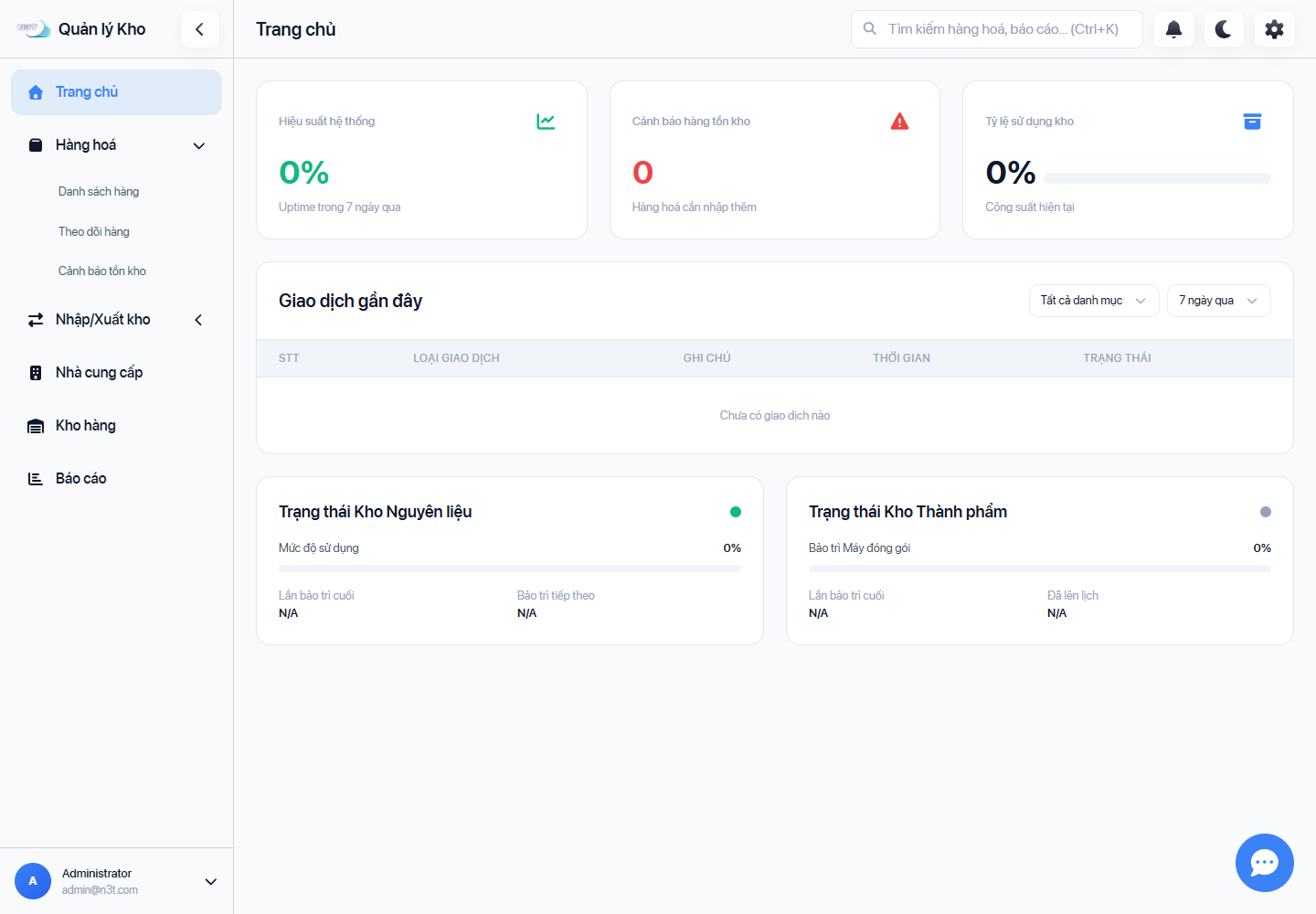
7499d98View full-size image ↗The full image opens in this tab. When opening from this article, use your browser’s Back button to return; you can save this image’s article link first.
The warehouse overview and Items screenshots were captured from the web app running with local FastAPI and SQLite. A demo account displays an empty dataset; 0 and N/A values represent empty or fallback interface states.
The application manages items, warehouses, and stock-in and stock-out records. Its interface includes an overview and task-specific lists.
I developed the interface and collaborated on the backend for the inventory application.
← → Scroll sideways for more columns if needed. Focus the table to use arrow keys.
| Area | Confirmed contribution |
|---|---|
| Interface | Interface development |
| Backend | Development in collaboration with the team |
The diagrams and flow below describe the shared product. They do not identify the author of each module or add infrastructure work to the confirmed contribution.
A recollection from working on the project; the captures and verification checks are documented separately below.
While trying the Warehouse application, I selected the same data file I had just imported to see what would happen. The action completed without an error, but some product quantities were added again. Nothing looked wrong with the interface.
Reading the handler again, I realized I had written “import file” before deciding what it meant: update a product list, replace current stock levels or record a new delivery? On screen, these actions looked similar—choose a file, press a button, wait for the table to update. In the data, they meant different things.
I returned to the import rules, product-code matching and feedback for invalid rows. I also tried cases I had paid less attention to: the same file twice, an empty quantity, extra spaces in a code, and a mix of valid and invalid rows.
What stayed with me was that the application did not look broken. The table was tidy and the buttons worked; a number was simply wrong. Since then, a “Success” message has been a reason to check the data once more, rather than the end of the check.
The React and TypeScript interface communicates with a single FastAPI application over HTTP and WebSocket. The backend handles inventory operations and stores data through SQLAlchemy in SQLite. The same frontend has a Tauri configuration for desktop packaging.
Authentication, inventory, chat and report export are handled within the same FastAPI application. SMTP for OTP email and Gemini for AI replies are optional integrations. Uploaded files are stored locally.
Read the architecture diagram from interface to data:
- The browser runs the React interface; Tauri is the configured desktop packaging option for the same frontend.
- HTTP and WebSocket connect the interface to modules within one FastAPI application.
- Inventory operations store data through SQLAlchemy in SQLite; uploaded files stay in local storage.
- SMTP and Gemini are optional integration branches.
The diagram describes source. The web run did not verify Tauri, email or AI.
This section describes how the system works, based on the project source and configuration.
When a user submits a stock-in voucher, the interface checks the required inputs and sends the data to the API. The backend updates item quantities, records incoming transactions and saves the voucher before broadcasting an inventory update.
The submitting page updates its list from the HTTP response. An open Items page can receive inventory:updated over WebSocket and call the API again for fresh data. These are separate update paths; arrival order across browsers is not guaranteed.
Read the stock-in diagram through the source sequence:
- The interface checks the required inputs and submits the voucher to the API.
- The backend updates item quantities and records incoming transactions and the voucher.
db.commit()anddb.refresh()happen before theinventory:updatedevent is broadcast.- The submitting page uses the HTTP response; a connected Items page can call the API again after receiving the event.
The two final paths have no shared arrival order. The notification is not a durable queue, and the interface capture did not create a voucher to test this flow.
Editorial source analysis, rather than a historical account of decisions made by Nam or the team.
Stock-in has two distinct milestones: persisting data and notifying the interface to update. In the source, db.commit() comes before broadcasting inventory:updated. That ordering lets the notification describe a saved change, but does not make persistence and notification one transaction.
The tradeoff is a fairly direct interface-update path, while data reliability and notification reliability need separate checks. A browser receiving the event can reload its list; the source does not establish that a disconnected browser will later receive every missed event. The submitting page’s HTTP response and another browser’s reload also do not establish a shared display order.
To inspect the reasoning, read stock-in creation at commit 7499d98. This is source ordering; the interface capture did not create a voucher or measure notification timing.
The application was run in web mode with a local backend. Demo sign-in worked, and the list pages loaded through the API. The screenshots use an empty dataset; full inventory workflows and the native Tauri application were not tested. On narrow screens, the sidebar still leaves too little space for the main content.
The WebSocket notification is sent after the data is committed and only to open connections. It is not a durable queue, and the notification is not part of the voucher’s database transaction.
Source is pinned to 7499d982e49b1b64c5848d568019c33a82467bbc. The capture record is timestamped 2026-09-08T16:42:43.705Z; source was rechecked on 10 September 2026. Neither timestamp is a project-completion date.
← → Scroll sideways for more columns if needed. Focus the table to use arrow keys.
| Task and environment | Evidence | Observation | Not checked |
|---|---|---|---|
| Demo sign-in; Windows, Node 22.14.0, Python 3.11.9, FastAPI, SQLite | Local web run | Signing in through the interface succeeded | SMTP OTP and real accounts |
| Dashboard and lists; same environment, empty data | Captures and local API requests | Pages loaded; 0/N/A are empty or fallback values | Inventory workflows, FIFO and business outcomes |
| Stock-in creation and notification | Pinned source | Data commit precedes WebSocket broadcast | Voucher creation, multiple browsers and disconnection |
| Desktop and optional integrations | Tauri, SMTP and Gemini source/configuration | Integration paths exist | Native build, native file export, email and AI |
The technical takeaway from the source is to separate “has the data been saved?” from “has every interface received the update?”. A dashboard image or a WebSocket event alone does not fully answer both questions.
Proposed next step: create one stock-in voucher with synthetic data in an isolated environment, open another browser, and compare persisted quantities with the HTTP response and reload triggered by the event. Include a disconnected-client case. This has not yet been performed and does not extend the evidence provided by the current images.
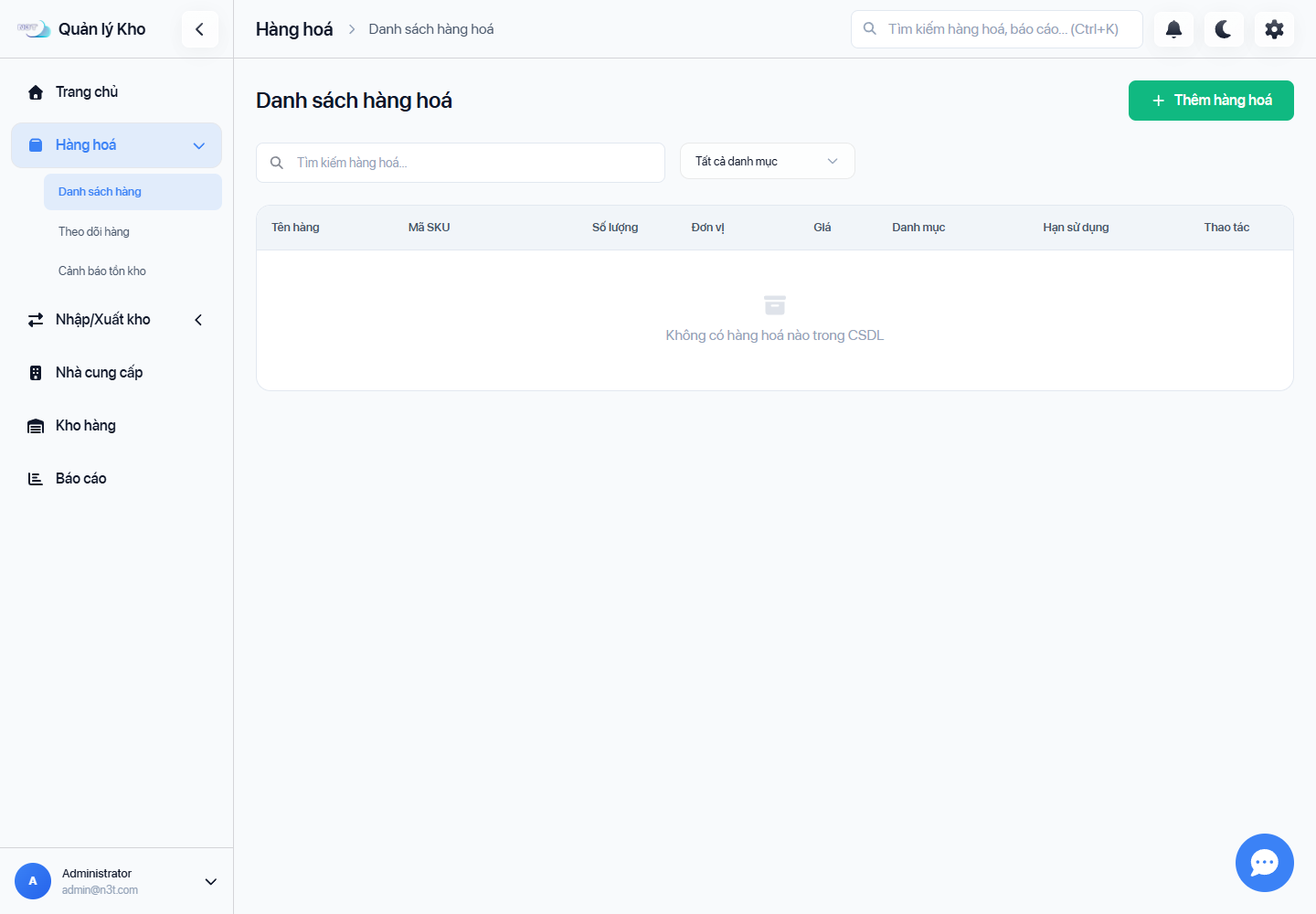
7499d98View full-size image ↗The full image opens in this tab. When opening from this article, use your browser’s Back button to return; you can save this image’s article link first.
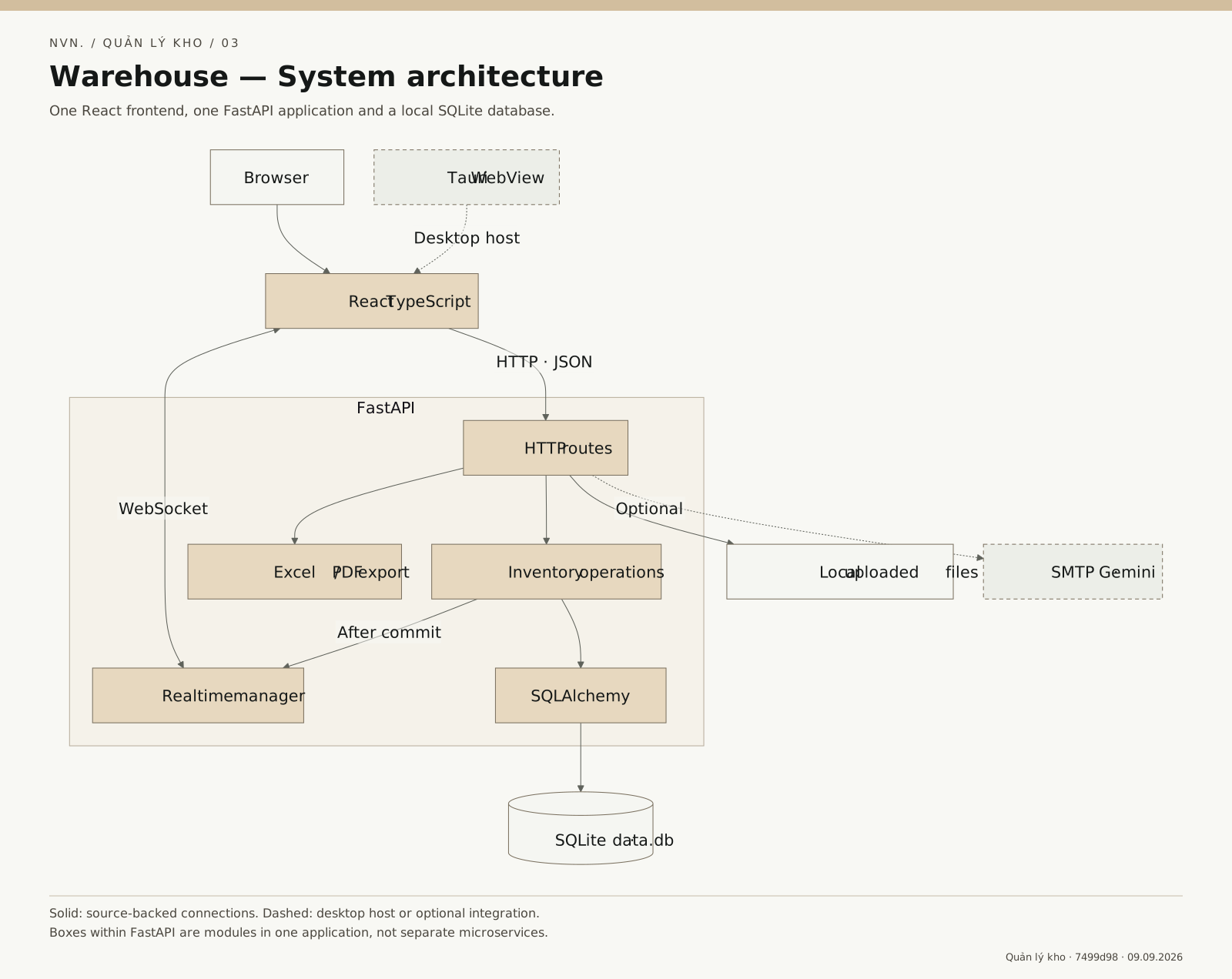
7499d98View full-size image ↗The full image opens in this tab. When opening from this article, use your browser’s Back button to return; you can save this image’s article link first.
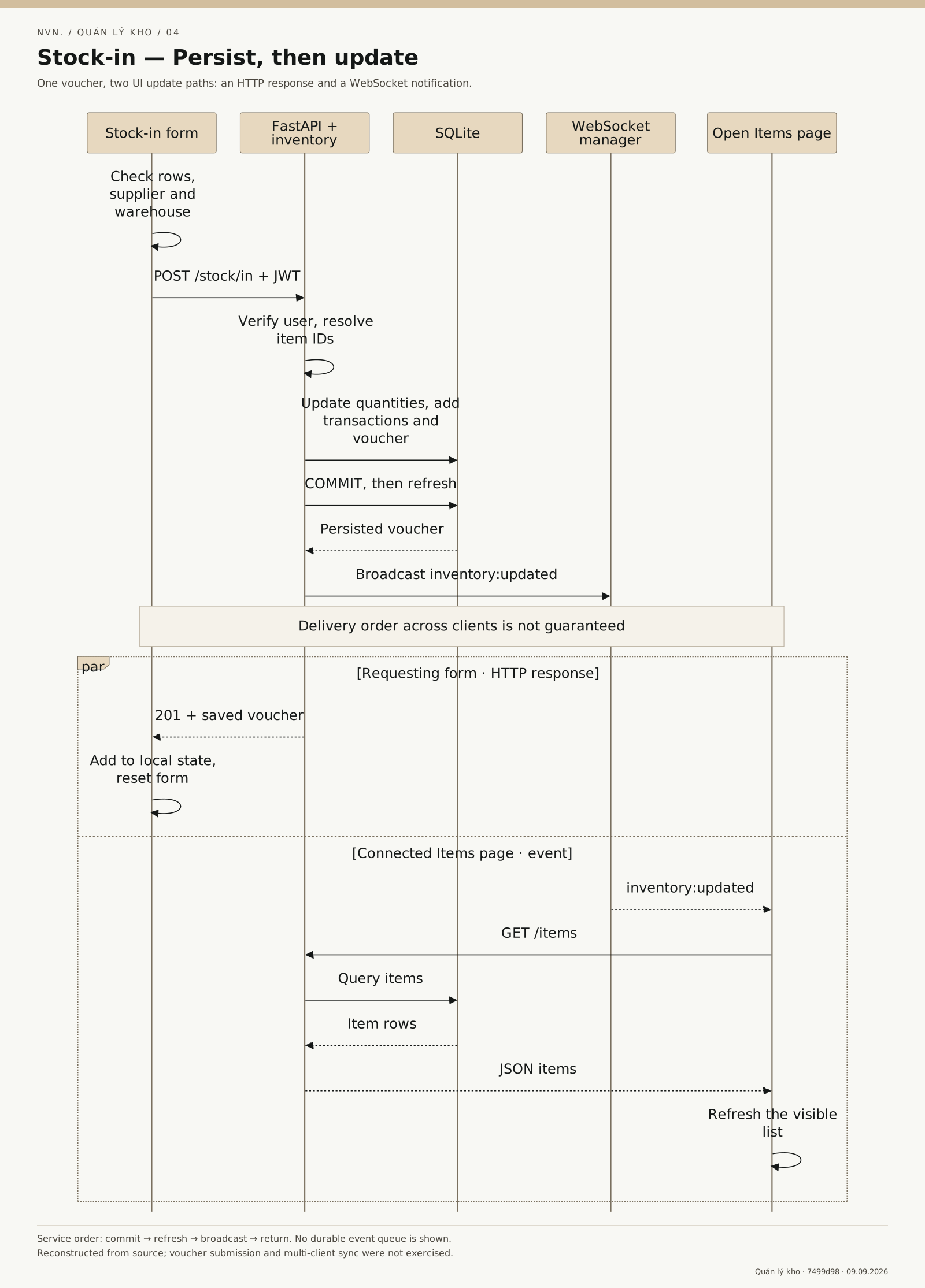
7499d98View full-size image ↗The full image opens in this tab. When opening from this article, use your browser’s Back button to return; you can save this image’s article link first.