Project
HealthOS
A web application for managing and tracking personal health.
My contribution
I developed the interface, collaborated on the backend and contributed to infrastructure setup.
About 6 min read
Updated
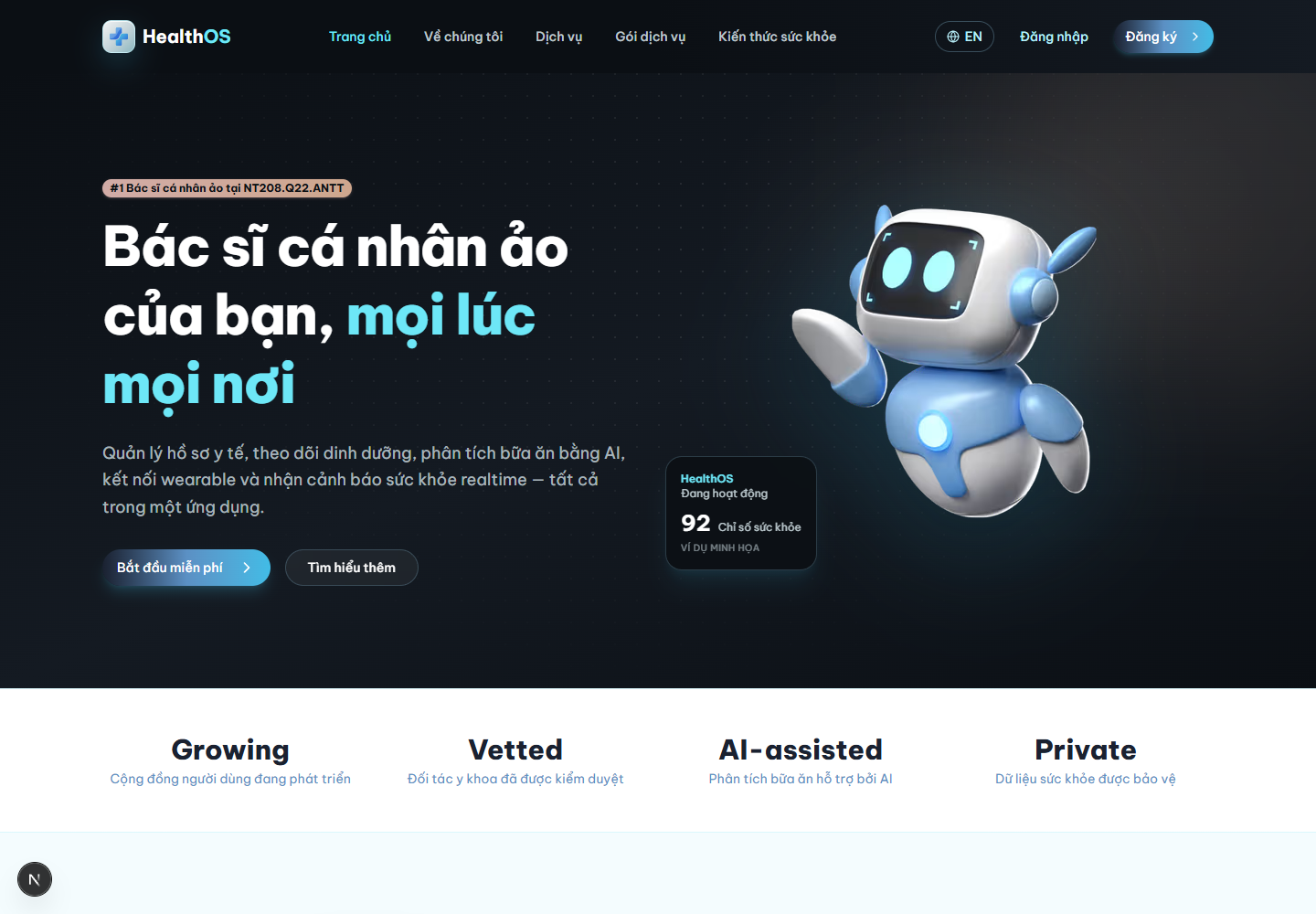
5131987View full-size image ↗The full image opens in this tab. When opening from this article, use your browser’s Back button to return; you can save this image’s article link first.
The homepage and services screenshots were captured from the frontend running locally. Health content in the interface is application sample data.
HealthOS is a personal health management application. Its web interface organizes services, accounts and health tracking.
I developed the web interface, collaborated on the backend and contributed to infrastructure setup for HealthOS.
← → Scroll sideways for more columns if needed. Focus the table to use arrow keys.
| Area | Confirmed contribution |
|---|---|
| Web interface | Interface development |
| Backend | Development in collaboration with the team |
| Infrastructure | Participation in setup |
The architecture below describes the shared project. Its technology list and diagrams do not mean I designed or implemented every component independently.
A recollection from working on the project; the captures and verification checks are documented separately below.
When I asked a friend to try the HealthOS demo, I sat beside them and tried not to explain what to do. They finished entering their information, pressed Save and asked, “Has it saved?” I immediately said yes. I knew the request had been sent and where the information was supposed to appear.
Then I looked at the screen again. They had no reason to know those things. The button barely changed, and the feedback was easy to miss. I had learned the interface through the memory of writing it. Knowing that a request was being handled was not the same as making its result clear to someone using the screen.
I went back to details I had planned to leave until later: a saving state, completion feedback, error messages and preserving input when an action failed. They were small details, but that one question showed me why they needed attention.
HealthOS made me want to check a screen without relying on what I already knew about the code. I started paying more attention to hesitation: places where the application was doing something, but the person using it could not tell what had happened or what to do next.
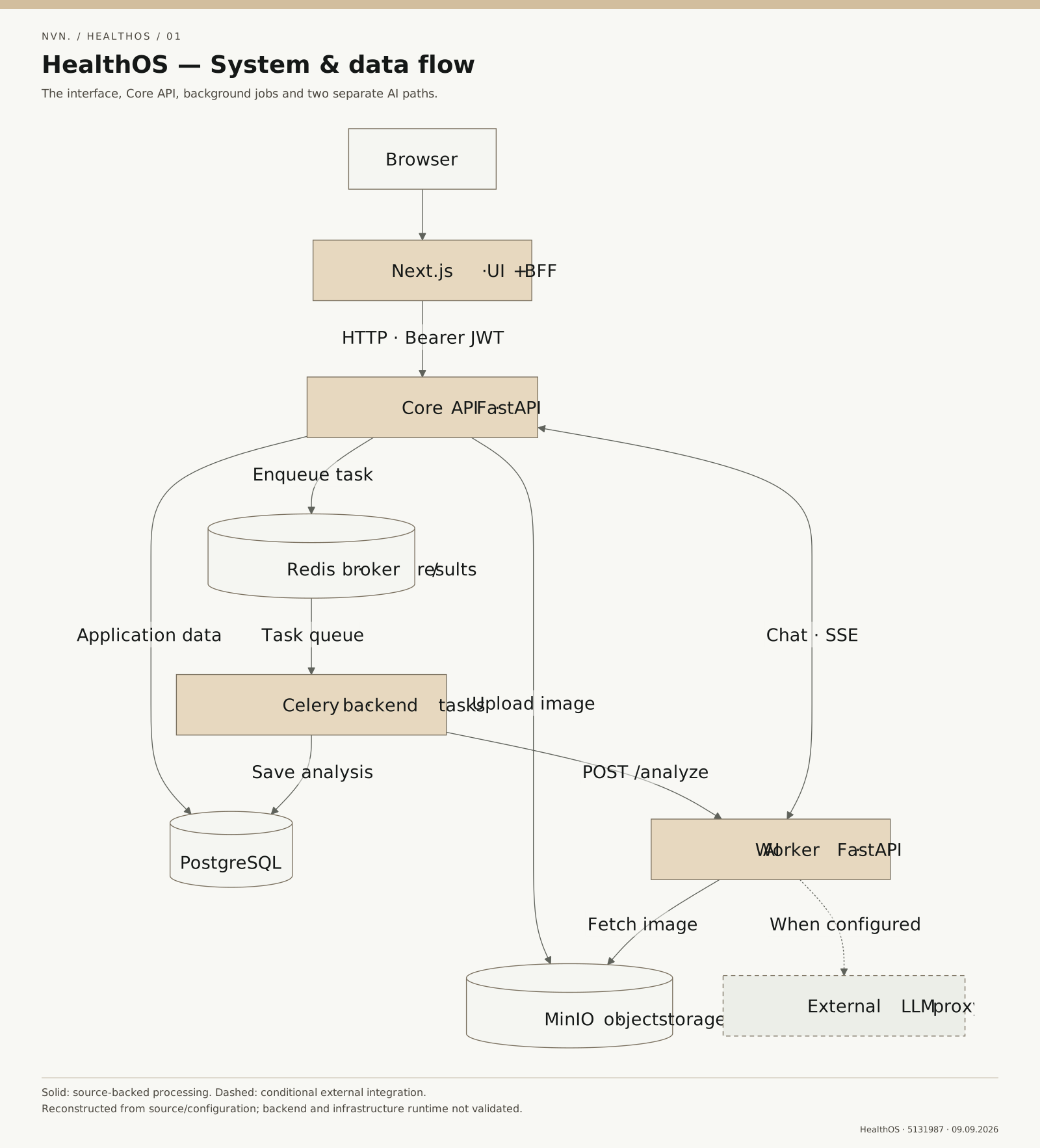
HealthOS uses Next.js for the interface and BFF layer, which connects to a FastAPI Core API. The Core works with PostgreSQL for application data, MinIO for images, and Redis for the Celery queue and JWT revocation checks.
For meal images, the Core stores the image and queues a Celery task. The worker calls the AI service, then writes the result or failure status to PostgreSQL. The AI service reads the image through a temporary storage URL.
Chat uses a separate SSE stream between the Core and the AI service. When configured, the AI service can call an external LLM proxy. This path is separate from the meal-image analysis queue.
Read the system and data-flow diagram one path at a time:
- The browser goes through Next.js and the BFF to reach the Core API.
- The Core stores application data in PostgreSQL and images in MinIO, and queues image-analysis work for Celery through Redis.
- The worker calls the AI service, which reads the image through a temporary URL. Results or failure status are written to PostgreSQL.
- Chat follows a separate SSE stream; the external LLM proxy participates only when configured.
These are paths found in source, not results from running the backend or AI.
This section describes how the system works, based on the project source and configuration.
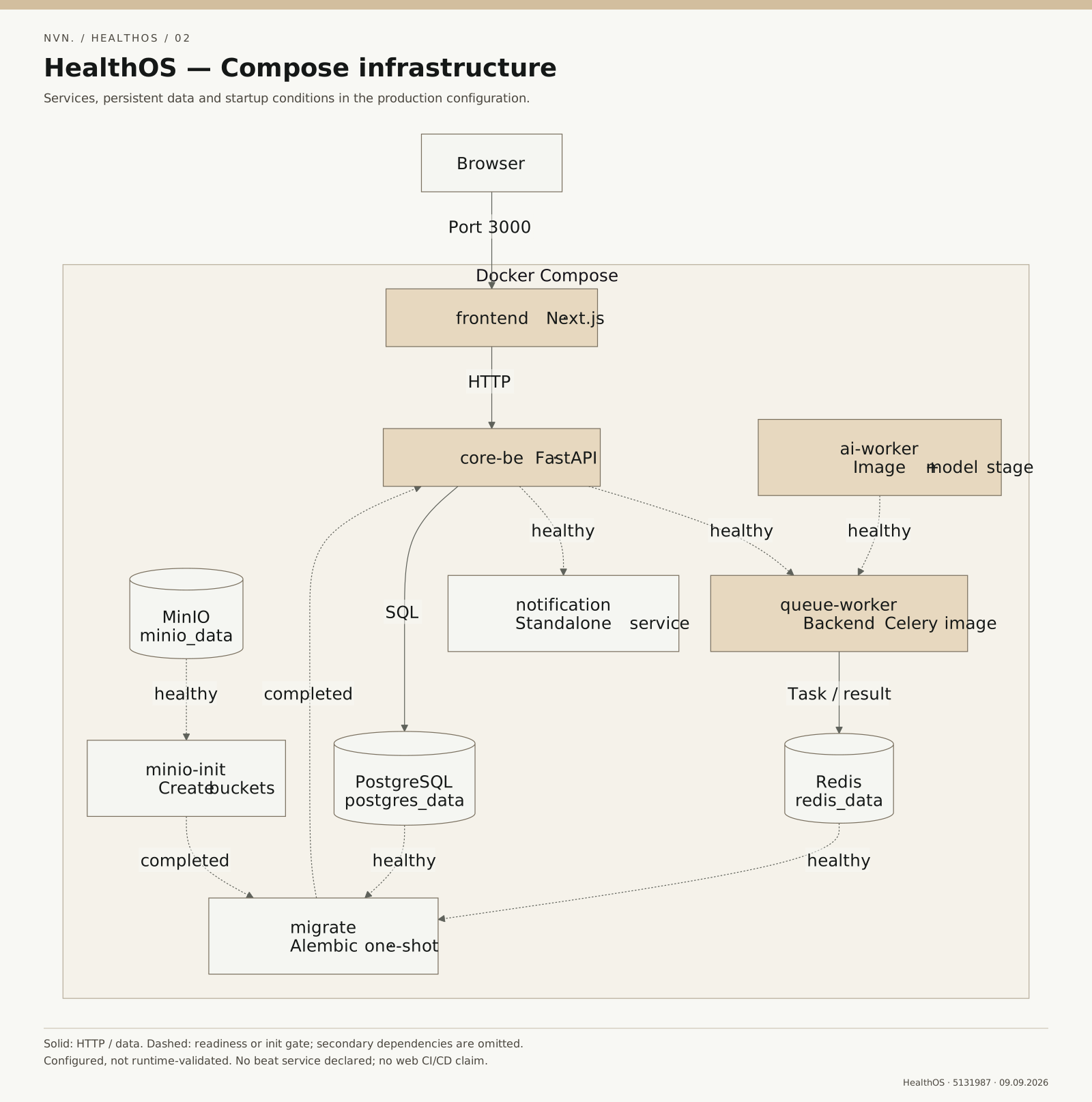
The Docker Compose configuration describes the frontend, Core API, workers, AI service and data services. Dockerfiles separate development and production targets, with dedicated volumes for PostgreSQL, Redis and MinIO. Initialization tasks, migrations and health checks define the startup order.
In the configuration, an initialization task creates the MinIO bucket and Alembic updates the schema before the Core API starts. The frontend and workers depend on the readiness of the services they use.
The repository includes PowerShell scripts for environment setup, service selection and startup in Docker or local mode. Its EAS workflows are specific to the mobile application and separate from the web and backend runtime configuration.
Read the configuration and startup diagram through its dependency milestones:
- PostgreSQL, Redis and MinIO have separate volumes and health checks.
- Initialization creates the MinIO buckets; the Alembic migration waits for its declared conditions before updating the schema.
- The Core waits for successful migration and the data services’ health checks.
- The frontend and worker wait for their corresponding configured health checks before starting.
These milestones describe dependency branches, not one serial startup sequence for every service. Dashed lines represent initialization or readiness conditions; the diagram does not establish a running production environment.
Editorial analysis of the source, rather than a historical account of options the team considered.
The configuration distinguishes a service starting, a passing health check and a completed initialization task. For example, the Core waits for a successful migration; the frontend waits for the Core’s health check. The order in which processes appear therefore does not fully explain when a dependent component can start.
The tradeoff is a clearer startup sequence whose usefulness depends on what each probe actually checks. A successful endpoint response establishes only the scope of that check. It does not establish working sign-in, image analysis or an entire data flow. Startup conditions also do not replace application handling of lost connections after startup.
To examine this analysis, read depends_on and healthcheck in Compose at commit 5131987. This is declared configuration, not a log of the complete HealthOS stack running.
The frontend was run locally to check the homepage and login page on desktop and mobile, along with the services page on desktop. The services tabs displayed the selected content. The Core API, database and workers were not started for this check, so login, health data and AI processing were not tested end to end.
The configuration defines scheduled Celery tasks, but no separate beat process was found in the reviewed startup files. WebSocket room and connection state is kept in a single process’s memory; this code does not establish synchronization across multiple processes.
Source is pinned to 5131987c953d800e1c343cc7156be7554e4e498f and was rechecked on 10 September 2026. That source-review date is not an application-run date; the current HealthOS image metadata does not record enough timing information to assign an exact observation date.
← → Scroll sideways for more columns if needed. Focus the table to use arrow keys.
| Task and environment | Evidence | Observation | Not checked |
|---|---|---|---|
| Home and Login; Windows, Node 22.14.0, Chrome; desktop/mobile | Local frontend run and captures | Public pages displayed; dashboard required sign-in | Successful sign-in and a populated dashboard |
| Services; same frontend, desktop | Interface interaction | Selecting a tab changed the service content | Executing AI tasks |
| Initialization, migration, Core and worker | Pinned Compose configuration | Startup conditions and health checks are declared | Full Compose run, recovery and production operation |
| Meal images and chat | Backend/AI source | Image processing queue and SSE chat use separate paths | AI results and end-to-end flows |
The technical takeaway from this review is to keep an observation beside the scope of the check that produced it. A frontend image, startup configuration and backend result are different forms of evidence; combining them in a diagram does not extend their verification.
Proposed next step: run one HealthOS dependency with its consumer, retain the exact health response, then observe the consumer after the dependency becomes unavailable. This HealthOS check has not been performed.
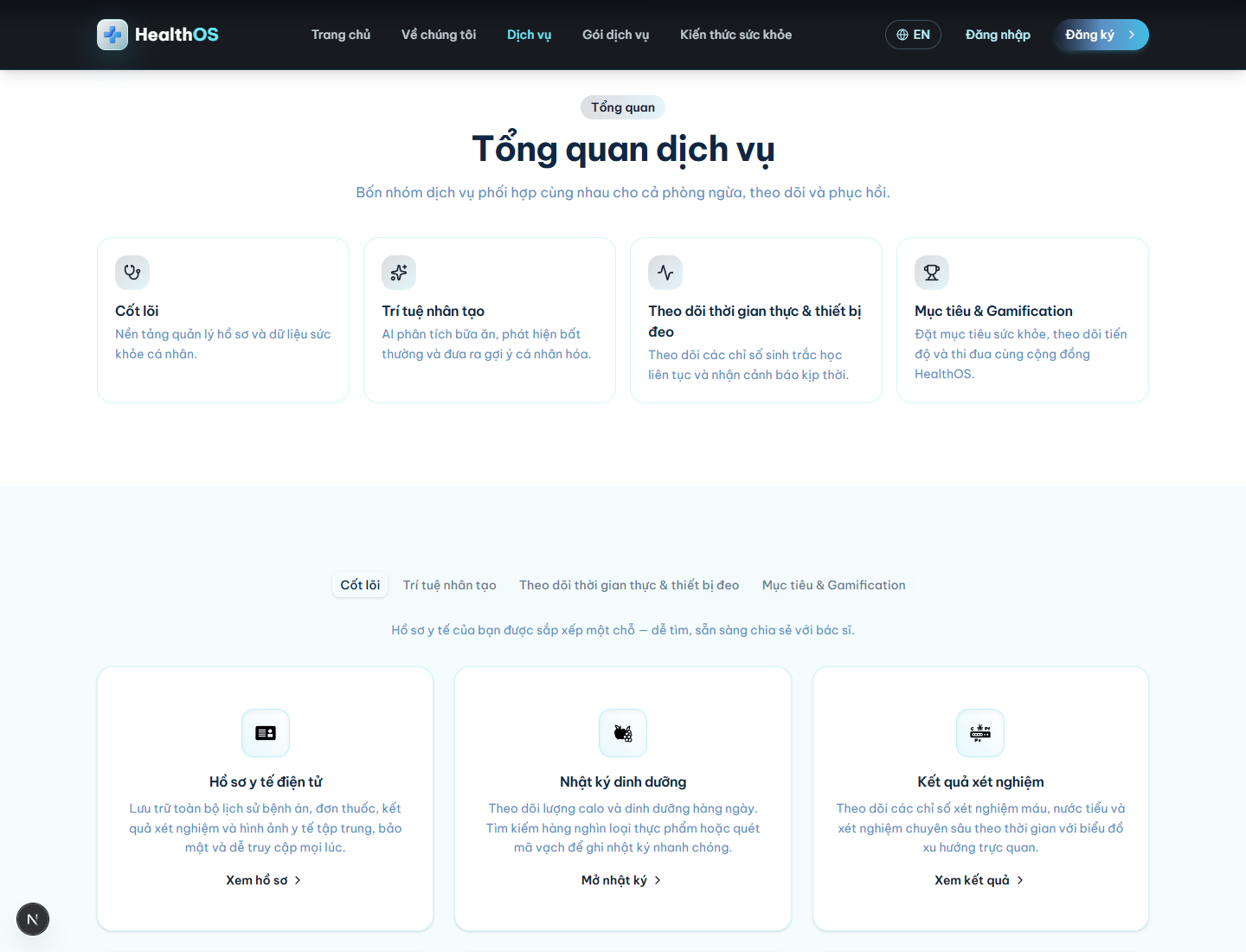
5131987View full-size image ↗The full image opens in this tab. When opening from this article, use your browser’s Back button to return; you can save this image’s article link first.
5131987View full-size image ↗The full image opens in this tab. When opening from this article, use your browser’s Back button to return; you can save this image’s article link first.
5131987View full-size image ↗The full image opens in this tab. When opening from this article, use your browser’s Back button to return; you can save this image’s article link first.